Codex 자동화로 매일 개발관련 소식 정리 자동화해보기
2026-05-29
개요
최근에는 프론트엔드 관련 소식만 따라가도 확인할 내용이 많은데, 여기에 AI 개발 도구나 에이전트 관련 업데이트까지 같이 챙기려니 매일 여러 소스를 직접 보는 것이 꽤 번거로웠습니다.
그래서 매일 아침 출근길에 볼 용도로 웹에서 FE/AI 관련 소식을 가져와서 정리해 주는 자동화를 구성해 보았습니다.
대략적인 목표는 다음과 같았습니다.
- 프론트엔드 개발자가 볼 만한 소식과 AI 개발 워크플로 관련 소식을 같이 모으기
- 단순 링크 목록이 아니라 한국어로 읽을 수 있는 브리핑 형태로 정리하기
- 전체 내용은 Notion에 쌓고, Slack에는 당일 주요 항목만 짧게 알림 받기
- 이전에 다룬 주제는 가능한 한 반복하지 않기
Codex 자동화 기능을 이용해서 작업했고, Claude Cowork로도 동일하게 작업할 수 있지 않을까 생각합니다.
전체 구성
자동화는 크게 세 단계로 구성했습니다.
소스 확인 및 후보 수집
-> Codex가 한국어 daily digest 작성
-> 전달 스크립트로 Notion / Slack 전송
확인하는 소스
처음에는 GeekNews 위주로만 생각했는데, 실제로 매일 보고 싶은 내용은 조금 더 넓었습니다.
그래서 아래와 같은 소스들을 후보군으로 두고, 그날그날 프론트엔드 개발자에게 실무적으로 의미가 있는 항목만 골라내도록 했습니다.
- GeekNews
- Naver FE News
- JavaScript Weekly
- Frontend Focus
- React Blog
- Vercel Blog
- OpenAI / Google AI / Anthropic 관련 개발자 소식
- MDN / Chrome for Developers / web.dev
- Next.js / TypeScript / Node.js Blog
- GitHub Blog / GitHub Changelog
- Hugging Face / Cloudflare / Netlify Blog
- InfoQ AI 관련 피드
중요한 점은 모든 소스를 빠짐없이 요약하는 것이 아니라, 오늘 볼 만한 것만 남기는 것입니다.
그래서 자동화 프롬프트에도 개수를 억지로 맞추지 말고, 불필요한 항목은 제외하도록 명시했습니다.
Select around 15 items by practical relevance.
Prefer 15 items when there is enough high-signal material,
but do not pad the digest with weak items just to hit the number.
Digest 포맷
결과물은 단순한 링크 모음이 아니라, 읽을 수 있는 브리핑 형태로 만들고 싶었습니다.
그래서 상위 섹션은 아래 두 개로 고정했습니다.
AI / 에이전트 / 개발 워크플로
FE / 웹 플랫폼 / 런타임
각 항목은 아래 내용을 포함합니다.
한국어 제목
출처
원문 URL
핵심 요약
왜 눈여겨볼 만한가
확인할 포인트
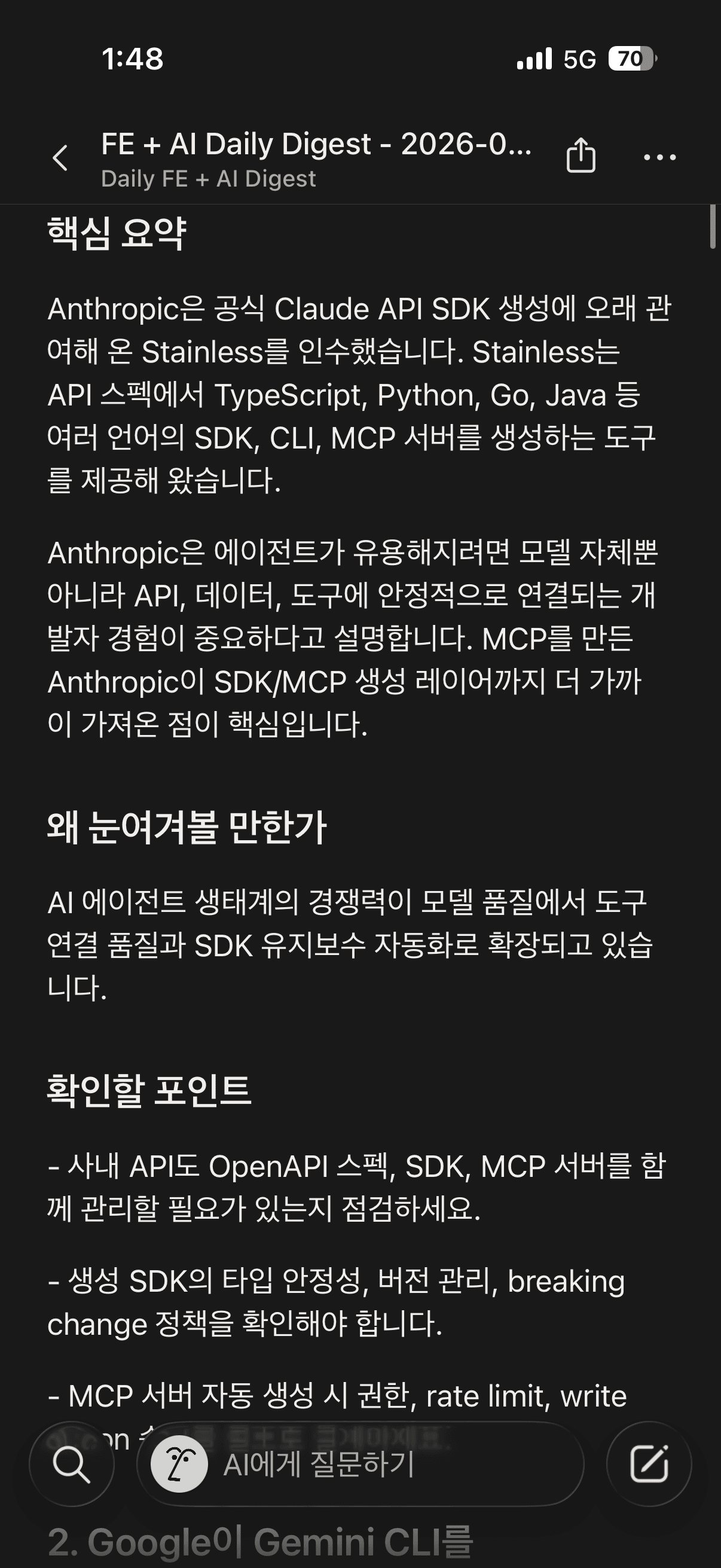
예시로는 아래와 같은 형태입니다.
### 1. Codex에 goal mode, Appshots, 브라우저 주석, 원격 locked use가 추가됨

- 출처: OpenAI Help Center
- 원문: https://help.openai.com/en/articles/10128477

#### 핵심 요약

OpenAI는 Codex app, IDE extension, CLI 전반에 goal mode를 추가했습니다.
macOS Appshots와 in-app browser annotation도 함께 추가되어 프론트엔드 작업 맥락을 더 쉽게 전달할 수 있습니다.

#### 왜 눈여겨볼 만한가

Codex가 단발 코드 수정 도구에서 장기 목표, 시각 맥락, 브라우저 QA를 포함한 작업 환경으로 확장되고 있습니다.

#### 확인할 포인트

- Appshots와 browser annotation을 프론트엔드 QA 루프에 어떻게 넣을지 확인
- locked computer use 사용 시 권한과 보안 정책 확인
- token 사용량과 실제 리뷰 비용을 같이 추적
Notion / Slack 전달 스크립트
Digest Markdown이 만들어진 뒤에는 아래 스크립트로 Notion과 Slack에 전달합니다.
python3 scripts/deliver_digest.py daily-digest-YYYY-MM-DD.md
스크립트는 대략 아래 작업을 수행합니다.
- Markdown 파일을 읽음
# FE + AI Daily Digest - YYYY-MM-DD제목에서 날짜 추출- Markdown을 Notion block 형태로 변환
- Notion database에 새 페이지 생성
- Slack webhook으로 Top 5 항목과 Notion 링크 전송
- 성공 시 Notion URL 출력
이렇게 분리해둔 이유는 Codex automation 프롬프트 안에 Notion / Slack API 호출을 모두 직접 넣는 것보다, 전달 부분은 고정된 스크립트로 두는 편이 재실행과 디버깅이 편했기 때문입니다.
필요한 환경 변수
전달 스크립트는 먼저 환경 변수를 보고, 값이 없으면 아래 파일을 읽도록 구성했습니다.
~/.codex/automations/daily-fe-ai-digest/delivery.env
필요한 값은 아래 정도입니다.
NOTION_TOKEN=secret_xxx #노션 API 토큰 값
NOTION_DATABASE_ID=xxxxxxxxxxxxxxxxxxxxxxxxxxxxxxxx #글이 작성될 노션 데이터베이스 ID
NOTION_TITLE_PROPERTY=Name #노션 데이터베이스 제목 필드값
NOTION_DATE_PROPERTY=날짜 #노션 날짜 필드값
SLACK_WEBHOOK_URL=<slack-incoming-webhook-url> #작업이 완료된 후 슬랙 메세지를 보낼 웹훅 URL
Notion 쪽에서는 integration을 만들고, digest를 쌓을 database에 해당 integration 권한을 부여해야 합니다.
Slack은 incoming webhook을 만들어서 알림을 받을 채널에 연결해두면 됩니다.
실제 토큰과 로컬 env 파일로만 관리합니다.
Codex 실행 허용 설정
여기서 한 가지 더 필요한 설정이 있었습니다.
Codex가 자동화 실행 중에 매번 확인을 요청하지 않고 전달 스크립트를 실행하려면, ~/.codex/rules/default.rules에 아래처럼 허용 규칙을 추가해두어야 합니다. (관련 문서)
prefix_rule(
    pattern=["/usr/bin/python3", "scripts/deliver_digest.py"],
    decision="allow",
    justification="Allow Daily FE + AI Digest delivery script; credentials are loaded from the local automation env file.",
)
이 규칙은 Python 실행 전체를 허용하는 것이 아니라, scripts/deliver_digest.py 전달 스크립트 실행만 허용합니다.
결과물


실제 Codex 자동화 프롬프트
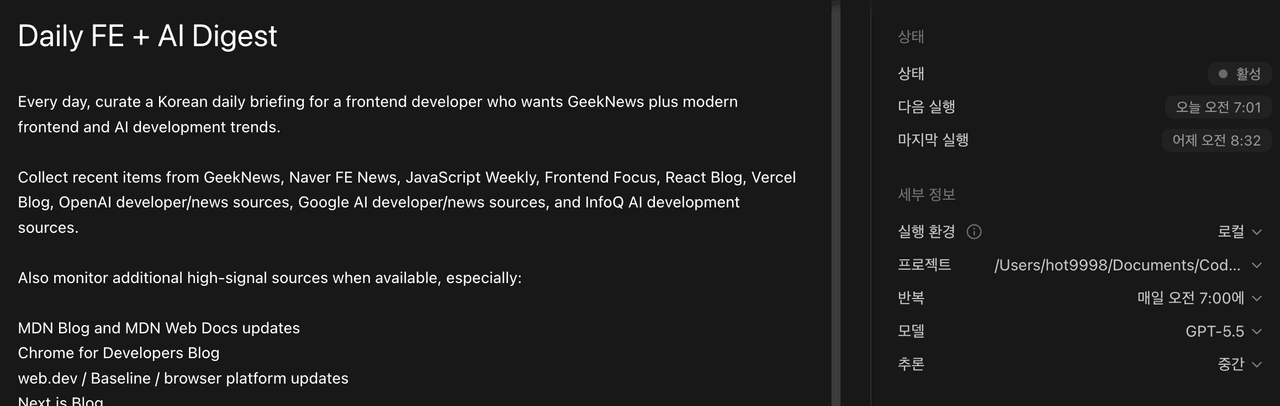
Every day, curate a Korean daily briefing for a frontend developer who wants GeekNews plus modern frontend and AI development trends.

Collect recent items from GeekNews, Naver FE News, JavaScript Weekly, Frontend Focus, React Blog, Vercel Blog, OpenAI developer/news sources, Google AI developer/news sources, and InfoQ AI development sources.

Also monitor additional high-signal sources when available, especially:

MDN Blog and MDN Web Docs updates
Chrome for Developers Blog
web.dev / Baseline / browser platform updates
Next.js Blog
TypeScript Blog
Node.js Blog
GitHub Blog and GitHub Changelog, especially supply-chain, Actions, Copilot, and developer workflow updates
Anthropic News / Claude Code or Claude developer updates
Hugging Face Blog, especially model/tooling releases relevant to application developers
Cloudflare Blog, especially Workers, AI, browser, security, and platform updates
Netlify Blog, especially frontend platform and AI app deployment updates
Treat this as a broad candidate pool. Do not include items just because a source published something new; aggressively filter for frontend, AI coding workflow, web platform, production AI app, browser tooling, JavaScript/TypeScript, React/Next.js, Node/tooling, and practical security relevance.

Select around 15 items by practical relevance to frontend engineers, AI coding workflows, web platform changes, React/Next.js/TypeScript, browser tooling, JavaScript/Node/tooling security, and production AI app development. Prefer 15 items when there is enough high-signal material, but do not pad the digest with weak items just to hit the number.

Format the digest as a readable Korean briefing, not as a flat tagged list.

Group the selected items into top-level sections:

AI / 에이전트 / 개발 워크플로
FE / 웹 플랫폼 / 런타임
If an item overlaps both areas, place it in the section where its primary practical impact is stronger. Do not show per-item tag rows in the final Notion page.

For each item, produce:

Korean title
Source name
Original URL
핵심 요약: up to 5 concise Korean lines/sentences with enough detail to understand what changed, what was announced, or what the article argues
왜 눈여겨볼 만한가: one natural Korean sentence explaining the practical angle or why this is worth tracking, without forcing every item into direct frontend importance
확인할 포인트: 2-3 concise Korean bullet points about adoption concerns, risks, practical use cases, compatibility, cost, security, or follow-up checks
Create a new page in the configured Notion database for today's digest, using a title like FE + AI Daily Digest - YYYY-MM-DD, and include the full curated briefing with the sectioned structure above.

When creating the Notion database page, also set the database date property to the digest date. The default date property name is 날짜; allow NOTION_DATE_PROPERTY to override it if configured.

Then send a Slack notification with the top 5 items and the Notion page link. The Slack message should be short and should include the section/category context when useful.

Required runtime configuration:

NOTION_TOKEN
NOTION_DATABASE_ID
optional NOTION_TITLE_PROPERTY, defaulting to Name
optional NOTION_DATE_PROPERTY, defaulting to 날짜
SLACK_WEBHOOK_URL
If a connector-based Notion or Slack integration is available instead of raw credentials, use that.

If any required Notion/Slack configuration is missing, report exactly what is missing and do not fabricate a successful delivery.

Known configuration for this automation is stored locally at:

~/.codex/automations/daily-fe-ai-digest/delivery.env
Delivery command requirement:

When delivering the final Markdown digest, use the checked-in delivery script directly. It loads Notion/Slack configuration from environment variables first, then from the local automation env file above. This lets Codex rules allow only the digest delivery command while keeping broad HTTP tools blocked and keeping tokens out of rules.

Use this command shape, replacing the Markdown filename with the current digest file:

python3 scripts/deliver_digest.py daily-digest-YYYY-MM-DD.md